Guide: Lead Management & CRM
HK Reach includes a built-in CRM designed to help you track your WhatsApp conversations and turn them into successful sales.
🏢 Business Owner's Guide (Non-Technical)
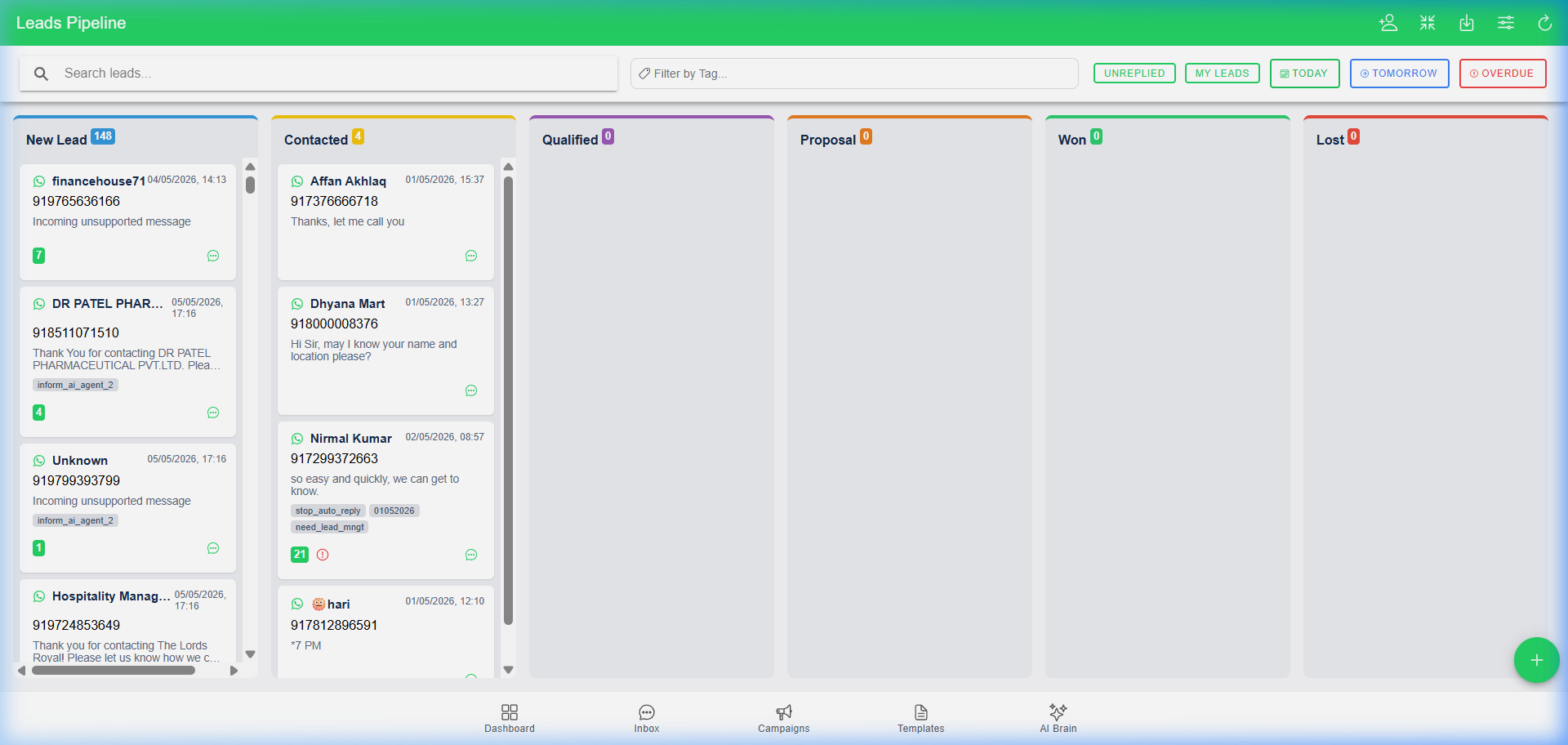
Stop losing track of potential customers. The Leads Pipeline gives you a visual "bird's eye view" of your entire sales process.
1. The Kanban Pipeline
Your leads are organized into columns (Stages). You can drag and drop a lead from one stage to another as they progress.
2. Smart Follow-up Reminders
Never miss a follow-up. Look for the bell icons on lead cards:
- 🟢 Green: Follow-up is due today.
- 🔵 Blue: Follow-up is scheduled for tomorrow.
- 🔴 Red: Overdue follow-up.
3. Automated WhatsApp Follow-ups
You can schedule a reminder that automatically sends a WhatsApp message at a specific time.
- Example: Schedule a "Happy Birthday" template to send on the customer's birthday.
- Example: Schedule a "Payment Link" to send 24 hours after an inquiry.
4. Internal Notes & History
Keep your team on the same page. Add private notes to any lead that only your team can see. Every note is stamped with the author's name and time.
5. Lead Quick Edit Popup
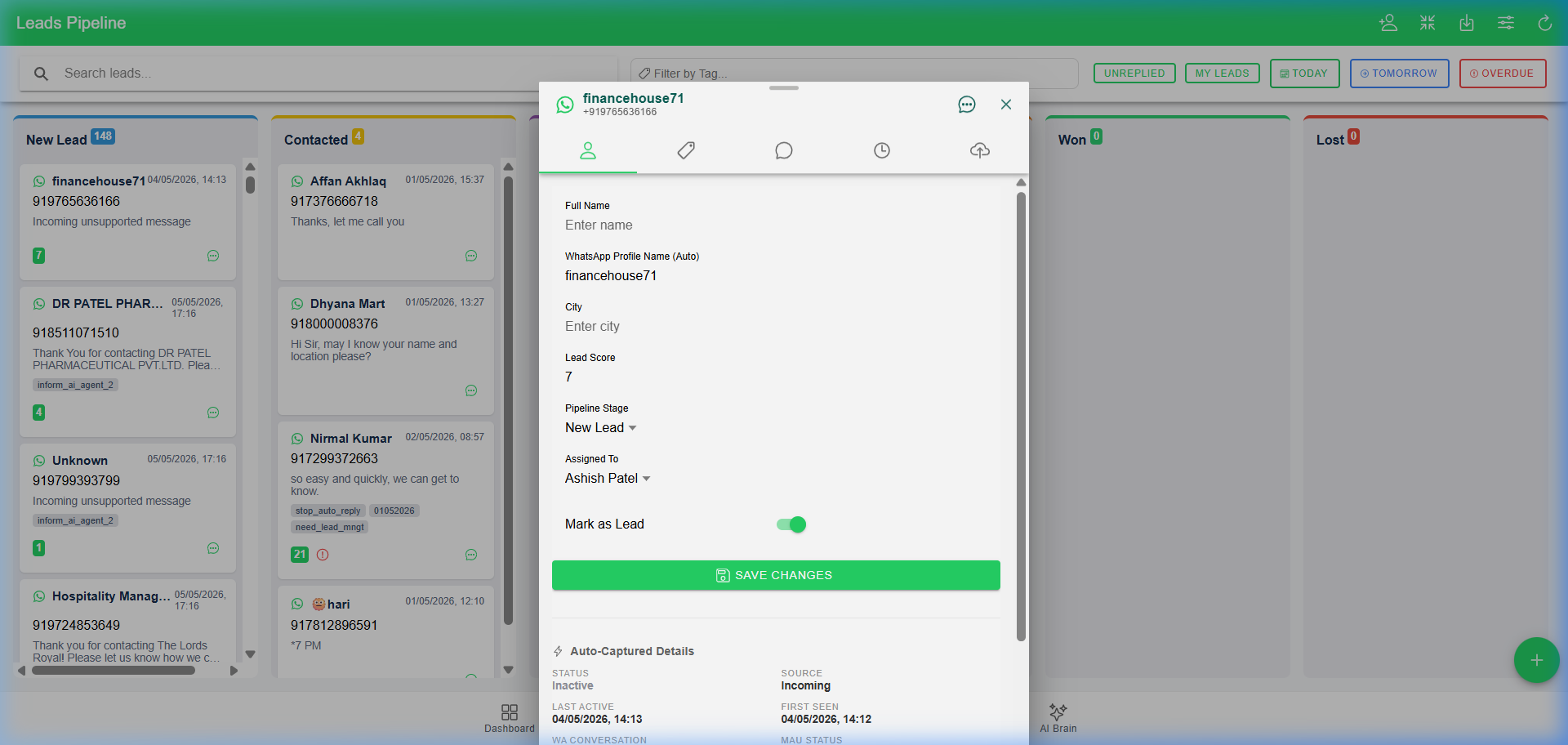
Click on any lead card in the pipeline to open the Quick Edit window. This is where the heavy lifting happens:
- Pipeline Stage: Move the lead through your sales process.
- Lead Scoring: Assign a score (0-100) to prioritize high-value customers.
- Agent Assignment: Assign the lead to yourself or a team member.
- Reminders: Schedule internal or automated WhatsApp follow-ups.
- Submissions: View data submitted by the user through your automated bot flows.
🛠️ Technical Administrator's Guide (Deep-Dive)
The CRM is a highly interactive module that synchronizes frontend state with backend business logic.
1. Agent Assignment & Roles
- Assignment: Every lead can be assigned to a specific User Account via the
AssignedToUserIdfield. - Filtering: Agents can filter the pipeline to see only "My Leads."
- Notifications: When a reminder is due, the system can notify the assigned agent via WhatsApp.
2. Advanced Reminders (Follow-ups)
- Internal: A simple notification for the agent.
- Automated: Triggers a Meta Template message.
- Hydration: Supports dynamic template parameters (e.g.,
{{1}}as the customer name). - Background Processing: Managed by
SocialCommsBackgroundServicewhich polls for due reminders every 60 seconds.
3. Lead Scoring & Auto-Capture
HK Reach captures metadata about every lead automatically:
- Lead Score: A 0-100 qualitative value manually or automatically assigned.
- MAU Status: Tracks if the lead is currently within a 24-hour paid conversation window.
- Source Tracking: Identifies if the lead came from WhatsApp, Facebook, or Instagram.
- BSUID: Unique Business-Scoped User ID for tracking across Meta platforms.
4. Submission Review & Mapping
When a user completes a Data Flow, it creates a LeadSubmission.
- Review Process: Admins can Review, Approve, or Reject submissions.
- Mapping: Data fields (like
TransactionIDorAmount) are extracted from theCollectedDataJsonand shown prominently in the review panel. - Screenshots: Automated storage of image uploads for quick verification.
5. API Hooks
Developers can use the Leads/move and Leads/reorder endpoints to sync HK Reach with external CRM systems (like Salesforce or Zoho).
[!TIP] You can see "Auto-Captured Details" (like BSUID and Last Active time) by opening any lead card and looking at the Stats section.